Reestruturação e Junção de Dados
Treinamento em R
Introduction
The Challenge
Your director walks in:
“We need to identify the top 5 firms with the largest VAT gaps in the retail sector. Break them down by firm size—small, medium, and large—based on annual taxable income from CIT data. Can you have this ready by tomorrow?”
🤔 You think:
- VAT gap = Expected VAT minus Actual VAT paid
- I have quarterly VAT data in separate columns
- Taxable income comes from CIT declarations (different file)
- Firm characteristics (industry) are in yet another file
- I need to join all three datasets together!
This module teaches you exactly how to solve this problem.
Today’s Roadmap
- Understand tidy data principles
- Reshape data between wide and long formats
- Join multiple datasets together
- Validate that your merges worked correctly
- Build a complete analysis-ready dataset
Solving the Challenge: The Approach
What data do we have?
- Quarterly VAT declarations (wide format: Q1, Q2, Q3, Q4 columns)
- Annual CIT declarations (contains taxable income)
- Firm registry (industry, firm characteristics)
What do we need to do?
- Reshape: Convert quarterly VAT from wide to long format
- Calculate: Annual VAT totals per firm
- Join: Combine VAT with CIT to get taxable income
- Categorize: Define firm size based on taxable income brackets
- Join: Add firm characteristics (industry)
- Filter & Rank: Select retail sector, find top 5 by size category
Key question: How do we get from messy, separate datasets to one clean analysis table?
Answer: By mastering reshaping and joins!
Tidy Data
Tidy Tax Administrative Data
What is Tidy Data?
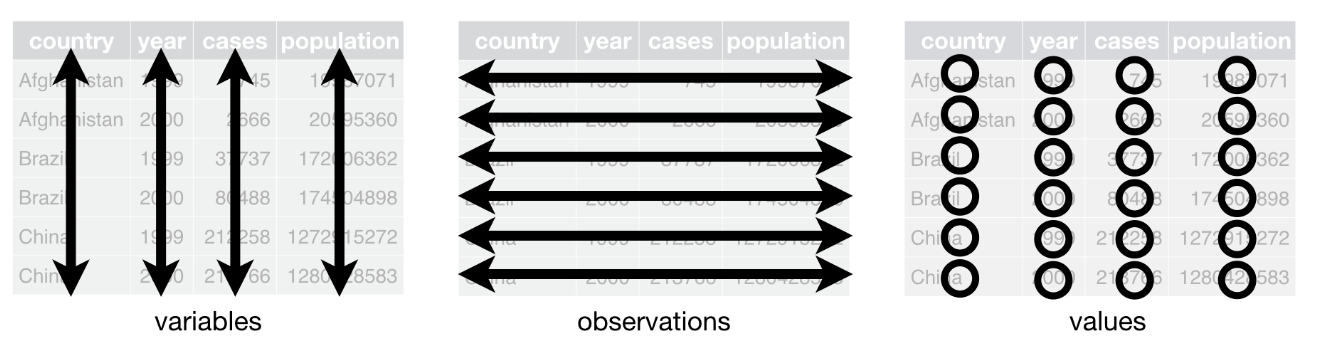
Tidy data organizes tax administrative data into a consistent, analysis-ready format:
- Each variable is a column; each column is a variable.
- Each observation is a row; each row is an observation.
- Each value is a cell; each cell is a single value.
Let’s Look at This Dataset
| Taxpayer ID | Tax Type | 2021 Q1 | 2021 Q2 | 2021 Q3 | 2021 Q4 |
|---|---|---|---|---|---|
| 101 | Income Tax | 500 | 600 | 450 | 700 |
| 102 | VAT | 300 | 400 | 350 | 500 |
What’s the problem with this dataset?
Problems:
- Quarter information (Q1, Q2, Q3, Q4) is spread across column names, not stored as data
- Each row contains multiple observations (4 quarters worth of data)
- Hard to filter for specific quarters or plot trends over time
What are the variables?
Taxpayer ID, Tax Type, Quarter, Payment Amount.
What constitutes a single observation in this dataset?
One observation is a specific tax payment for a taxpayer during a particular quarter.
Making It Tidy
How would you reshape the dataset to meet the three tidy characteristics?
- Each variable is a column; each column is a variable.
- Each observation is a row; each row is an observation.
- Each value is a cell; each cell is a single value.
Tidy Version
| Taxpayer ID | Tax Type | Quarter | Payment Amount |
|---|---|---|---|
| 101 | Income Tax | 2021 Q1 | 500 |
| 101 | Income Tax | 2021 Q2 | 600 |
| 101 | Income Tax | 2021 Q3 | 450 |
| 101 | Income Tax | 2021 Q4 | 700 |
| 102 | VAT | 2021 Q1 | 300 |
| 102 | VAT | 2021 Q2 | 400 |
| 102 | VAT | 2021 Q3 | 350 |
| 102 | VAT | 2021 Q4 | 500 |
Why Does This Matter?
Tidy data makes analysis easier:
- Calculate statistics by group (e.g., average payment by quarter)
- Create visualizations with ggplot2
- Apply functions consistently across observations
- Join datasets without confusion
The Goal
Most of our work involves transforming messy data into tidy data, then analyzing it.
Part 1: Understanding Data Structure
Unit of Observation vs. Unit of Analysis
Unit of Observation
What each row represents in your raw data
- Firm-quarter VAT filing
- Firm-year CIT declaration
- Individual transaction
Unit of Analysis
What you need for your analysis
- Firm-year compliance rate
- Industry-level trends
- Aggregate tax gap
Example: You have firm-quarter observations but need firm-year analysis
- Observations: FIRM_001 has 4 rows (Q1, Q2, Q3, Q4 of 2023)
- Analysis: You want 1 row per firm-year with annual total
Wide vs. Long Format
Wide Format
Each time period is a column
| firm_id | Q1_vat | Q2_vat | Q3_vat | Q4_vat |
|---|---|---|---|---|
| FIRM_01 | 1000 | 1200 | 1100 | 1300 |
| FIRM_02 | 800 | 900 | 950 | 1000 |
Good for:
- Calculating period-over-period changes
- Summary tables
- Spreadsheet-style viewing
Long Format
Each observation is a row
| firm_id | quarter | vat_amount |
|---|---|---|
| FIRM_01 | Q1 | 1000 |
| FIRM_01 | Q2 | 1200 |
| FIRM_01 | Q3 | 1100 |
| FIRM_01 | Q4 | 1300 |
| FIRM_02 | Q1 | 800 |
Good for:
- Time series plots
- Group-by operations
- Most statistical analyses
Part 2: Reshaping Data
Why Pivot Longer?
Most common transformation in tax data analysis
Wide quarterly VAT data:
| firm_id | vat_q1 | vat_q2 | vat_q3 | vat_q4 |
|---|---|---|---|---|
| FIRM_01 | 5000 | 5200 | 4800 | 5500 |
↓ Transform to long ↓
| firm_id | quarter | vat_amount |
|---|---|---|
| FIRM_01 | Q1 | 5000 |
| FIRM_01 | Q2 | 5200 |
| FIRM_01 | Q3 | 4800 |
| FIRM_01 | Q4 | 5500 |
Why? Required for:
- Plotting time trends with ggplot2
- Calculating quarterly growth rates
- Group-by operations (e.g., average by quarter)
- Any analysis that treats time as a variable
pivot_longer() Syntax
Breaking it down:
cols: Columns to reshape (the ones with repeated measurements)names_to: Name for the new column that will hold the old column namesvalues_to: Name for the new column that will hold the values
Think of it as “unpacking”
You’re taking columns (Q1, Q2, Q3, Q4) and unpacking them into rows, storing the column name (Q1) and its value (5000) separately.
Live Example: Pivot Longer
# Show the wide format first
head(vat_wide, 3)

# Transform to long format
vat_long <- vat_wide %>%
  pivot_longer(
    cols = c(vat_q1, vat_q2, vat_q3, vat_q4),
    names_to = "quarter",
    values_to = "vat_amount"
  )

# Show the result
head(vat_long, 6)

# Check dimensions
cat("Wide format:", nrow(vat_wide), "rows\n")
cat("Long format:", nrow(vat_long), "rows (4x more!)\n")🏋️♀️ Exercise 1: Pivot Longer Practice
Task: Reshape the provided wide CIT data to long format
- Open
exercise_04_01_template.R - Load the wide CIT data from
data/Intermediate/cit_wide.csv - Use
pivot_longer()to transform year columns to long format - Verify the result has 4x more rows
10:00 Why Pivot Wider?
Less common, but important for specific tasks
Long format data:
| firm_id | year | tax_type | amount |
|---|---|---|---|
| FIRM_01 | 2023 | VAT | 20000 |
| FIRM_01 | 2023 | CIT | 15000 |
| FIRM_02 | 2023 | VAT | 18000 |
| FIRM_02 | 2023 | CIT | 12000 |
↓ Transform to wide ↓
| firm_id | year | VAT | CIT |
|---|---|---|---|
| FIRM_01 | 2023 | 20000 | 15000 |
| FIRM_02 | 2023 | 18000 | 12000 |
Why? Useful for:
- Creating summary tables
- Calculating ratios (VAT/CIT)
- Period-over-period comparisons
- Side-by-side comparisons
pivot_wider() Syntax
Breaking it down:
id_cols: Columns that uniquely identify each row in the resultnames_from: Which column contains the values that will become new column namesvalues_from: Which column contains the values to fill the new columns
Watch out for duplicates!
If you have multiple rows with the same combination of id_cols and names_from, pivot_wider() will create a list-column. Always check your data first!
Live Example: Pivot Wider
# Create sample data with VAT and CIT
tax_long <- tibble(
  firm_id = rep(c("FIRM_01", "FIRM_02"), each = 2),
  year = rep(2023, 4),
  tax_type = rep(c("VAT", "CIT"), 2),
  amount = c(20000, 15000, 18000, 12000)
)

# Show long format
print(tax_long)

# Transform to wide format
tax_wide <- tax_long %>%
  pivot_wider(
    id_cols = c(firm_id, year),
    names_from = tax_type,
    values_from = amount
  )

# Show result
print(tax_wide)

# Now we can easily calculate the VAT/CIT ratio
tax_wide <- tax_wide %>%
  mutate(vat_cit_ratio = VAT / CIT)

print(tax_wide)
Part 3: Joining Data
Why Join Data?
In tax administration, data lives in separate systems:
VAT System
- Quarterly declarations
- Input/output VAT
- Refunds
CIT System
- Annual declarations
- Taxable income
- Tax paid
Firm Registry
- Industry
- Size
- Region
The Goal
Combine these datasets to analyze firm behavior across multiple tax types and characteristics.
The Relational Data Model
Three separate tables linked by firm_id:
Table 1: VAT (panel_vat)
| firm_id | quarter | vat_amount |
|---|---|---|
| FIRM_01 | Q1 | 5000 |
| FIRM_01 | Q2 | 5200 |
Table 2: CIT (panel_cit)
| firm_id | year | cit_amount |
|---|---|---|
| FIRM_01 | 2023 | 15000 |
| FIRM_02 | 2023 | 12000 |
Table 3: Firms (dt_firms)
| firm_id | industry | size |
|---|---|---|
| FIRM_01 | Retail | Medium |
| FIRM_02 | Services | Small |
The key: firm_id appears in all three tables, allowing us to link them together.
Join Keys: How R Matches Rows
Join key = The column(s) used to match rows between tables
Table A (VAT)
| firm_id | vat |
|---|---|
| FIRM_01 | 5000 |
| FIRM_02 | 4500 |
| FIRM_03 | 6000 |
Table B (Firms)
| firm_id | industry |
|---|---|
| FIRM_01 | Retail |
| FIRM_02 | Services |
+
= ?
R matches rows where firm_id is the same
- FIRM_01 → Match ✓
- FIRM_02 → Match ✓
- FIRM_03 → No match ?
What happens with FIRM_03?
That depends on the join type!
Join Types
left_join(): The Workhorse
Most commonly used join (80% of real-world cases)
Keeps all rows from left table
Table A (left)
| firm_id | vat |
|---|---|
| FIRM_01 | 5000 |
| FIRM_02 | 4500 |
| FIRM_03 | 6000 |
Table B (right)
| firm_id | industry |
|---|---|
| FIRM_01 | Retail |
| FIRM_02 | Services |
Result: left_join(A, B)
| firm_id | vat | industry |
|---|---|---|
| FIRM_01 | 5000 | Retail |
| FIRM_02 | 4500 | Services |
| FIRM_03 | 6000 | NA |
Note: FIRM_03 kept, but industry is NA
Why it’s the default
Preserves your primary dataset (the left table). Perfect for enriching existing data with additional attributes.
left_join() in Action
# Create sample data
vat_data <- tibble(
  firm_id = c("FIRM_01", "FIRM_02", "FIRM_03"),
  quarter = c("Q1", "Q1", "Q1"),
  vat_amount = c(5000, 4500, 6000)
)

firm_data <- tibble(
  firm_id = c("FIRM_01", "FIRM_02"),
  industry = c("Retail", "Services"),
  size = c("Medium", "Small")
)

# Show original tables
cat("VAT data:\n")
print(vat_data)

cat("\nFirm data:\n")
print(firm_data)

# Perform left join
vat_enriched <- left_join(vat_data, firm_data, by = "firm_id")

cat("\nAfter left_join:\n")
print(vat_enriched)

# Check row counts
cat("\nRow count check:\n")
cat("VAT data:", nrow(vat_data), "rows\n")
cat("Result:", nrow(vat_enriched), "rows (same!)\n")🏋️♀️ Exercise 2: Your First Join
Task: Join CIT data to firm characteristics
- Open
exercise_04_02_template.R - Load
panel_cit.csvanddt_firms.csv - Use
left_join()to add firm characteristics to CIT data - Verify the row count matches the CIT data
10:00 inner_join(): Only Matches
Keeps only rows that exist in BOTH tables
Table A
| firm_id | vat |
|---|---|
| FIRM_01 | 5000 |
| FIRM_02 | 4500 |
| FIRM_03 | 6000 |
Table B
| firm_id | industry |
|---|---|
| FIRM_01 | Retail |
| FIRM_02 | Services |
Result: inner_join(A, B)
| firm_id | vat | industry |
|---|---|---|
| FIRM_01 | 5000 | Retail |
| FIRM_02 | 4500 | Services |
Note: FIRM_03 dropped (no match in Table B)
full_join(): Everything
Keeps ALL rows from BOTH tables
Table A
| firm_id | vat |
|---|---|
| FIRM_01 | 5000 |
| FIRM_02 | 4500 |
Table B
| firm_id | cit |
|---|---|
| FIRM_02 | 12000 |
| FIRM_03 | 15000 |
Result: full_join(A, B)
| firm_id | vat | cit |
|---|---|---|
| FIRM_01 | 5000 | NA |
| FIRM_02 | 4500 | 12000 |
| FIRM_03 | NA | 15000 |
Note: All firms kept, with NAs where no match
anti_join(): The Detective Tool
Returns rows from left table that DON’T have a match in right table
Table A (VAT filers)
| firm_id | vat |
|---|---|
| FIRM_01 | 5000 |
| FIRM_02 | 4500 |
| FIRM_03 | 6000 |
Table B (CIT filers)
| firm_id | cit |
|---|---|
| FIRM_01 | 15000 |
| FIRM_02 | 12000 |
Result: anti_join(A, B)
| firm_id | vat |
|---|---|
| FIRM_03 | 6000 |
Note: Only FIRM_03 returned (filed VAT but not CIT)
Critical for diagnostics!
Use anti_join() to find:
- Firms that filed VAT but not CIT
- Records that failed to merge (data quality issues)
- Missing values in lookup tables
Visual Comparison: All Four Join Types
Same Example Data, Different Join Types:
Table A (VAT)
| firm_id | vat |
|---|---|
| FIRM_01 | 5000 |
| FIRM_02 | 4500 |
| FIRM_03 | 6000 |
Table B (CIT)
| firm_id | cit |
|---|---|
| FIRM_01 | 15000 |
| FIRM_02 | 12000 |
| FIRM_04 | 18000 |
Visual Comparison: Results
left_join(A, B)
| firm_id | vat | cit |
|---|---|---|
| FIRM_01 | 5000 | 15000 |
| FIRM_02 | 4500 | 12000 |
| FIRM_03 | 6000 | NA |
Rows: 3 (all from A)
inner_join(A, B)
| firm_id | vat | cit |
|---|---|---|
| FIRM_01 | 5000 | 15000 |
| FIRM_02 | 4500 | 12000 |
Rows: 2 (only matches)
full_join(A, B)
| firm_id | vat | cit |
|---|---|---|
| FIRM_01 | 5000 | 15000 |
| FIRM_02 | 4500 | 12000 |
| FIRM_03 | 6000 | NA |
| FIRM_04 | NA | 18000 |
Rows: 4 (all from both)
anti_join(A, B)
| firm_id | vat |
|---|---|
| FIRM_03 | 6000 |
Rows: 1 (in A, not in B)
Join Best Practices
Multiple-Key Joins
Sometimes one key isn’t enough
Problem: Same firm appears in multiple years
VAT data (panel)
| firm_id | year | quarter | vat |
|---|---|---|---|
| FIRM_01 | 2022 | Q1 | 5000 |
| FIRM_01 | 2023 | Q1 | 5200 |
Firm characteristics (also panel)
| firm_id | year | industry |
|---|---|---|
| FIRM_01 | 2022 | Retail |
| FIRM_01 | 2023 | Retail |
If you join only by firm_id, you’ll get duplicate matches!
Different Column Names
Real data often has inconsistent naming
Table A uses ‘id’
| id | vat |
|---|---|
| FIRM_01 | 5000 |
Table B uses ‘firm_id’
| firm_id | industry |
|---|---|
| FIRM_01 | Retail |
Part 4: Validating Joins
Why Validation Matters
⚠️ Horror Story
You run a join. Everything looks fine. You send results to your director.
😱 The next day:
“These numbers look wrong. Why do we have 50,000 firm-year observations when we only have 5,000 firms?”
What happened? Duplicate keys in the right table caused a row explosion.
Lesson: Trust, but verify. ALWAYS validate your joins.
Common Join Problems
- Duplicate keys → Row explosion
- Right table has multiple rows per key
- Result: More rows than you started with
- Missing keys → Unwanted NAs
- Keys don’t match between tables
- Result: Lots of missing values
- Data type mismatches → Zero matches
- One table has numeric IDs, the other has character IDs
- Result: No rows match at all
- Typos in join column names
- You wrote
by = "firm_id"but one table uses"firm_ID" - Result: Error or cartesian join
- You wrote
Diagnostic Checklist
BEFORE joining:
# 1. Check for duplicate keys in both tables
panel_vat %>%
  count(firm_id, year) %>%
  filter(n > 1)

dt_firms %>%
  count(firm_id, year) %>%
  filter(n > 1)

# 2. Verify key columns exist and have same type
str(panel_vat$firm_id)
str(dt_firms$firm_id)

# 3. Check for missing values in key columns
sum(is.na(panel_vat$firm_id))
sum(is.na(dt_firms$firm_id))
Diagnostic Checklist (cont.)
AFTER joining:
# 4. Check row count - does it make sense?
cat("Before join:", nrow(panel_vat), "rows\n")
cat("After join:", nrow(merged_data), "rows\n")

# For left_join, should match left table (unless right has duplicates)
# For inner_join, should be less than or equal to either table

# 5. Find non-matches using anti_join
unmatched <- anti_join(panel_vat, dt_firms, by = c("firm_id", "year"))
cat("Unmatched rows:", nrow(unmatched), "\n")

# 6. Check for unexpected NAs in joined columns
merged_data %>%
  summarize(
    na_industry = sum(is.na(industry)),
    na_size = sum(is.na(size))
  )

# 7. Spot check a few rows
merged_data %>%
  filter(firm_id == "FIRM_001") %>%
select(firm_id, year, vat_amount, industry, size)🏋️♀️ Exercise 3: Diagnose and Fix
Task: The provided join produces the wrong number of rows. Find and fix the problem.
- Open
exercise_04_03_template.R - Run the broken join code
- Use diagnostic tools to identify the problem
- Fix the join and validate the result
15:00 Part 5: Complete Workflow
Bringing It All Together
Realistic Scenario: Computing VAT Gap by Firm Size
Your director wants to identify top 5 firms with largest VAT gaps in retail, segmented by size.
The Pipeline:
- Reshape: Convert quarterly VAT data from wide to long format
- Aggregate: Calculate annual VAT totals per firm
- Aggregate: Calculate annual taxable income from CIT data
- Join: Combine VAT with CIT data to get taxable income
- Join: Add firm characteristics (industry)
- Categorize: Create firm size categories based on taxable income
- Small: Taxable Income < $50K
- Medium: $50K ≤ Taxable Income < $125K
- Large: Taxable Income ≥ $125K
- Calculate: VAT gap = Expected VAT - Actual VAT paid
- Filter & Rank: Select retail industry, find top 5 by size category
- Validate: Check results make sense
Live Coding: Complete Pipeline
# Step 1: Reshape VAT from wide to long (if needed)
# In this example, panel_vat is already long, so we'll aggregate directly

# Step 2: Aggregate VAT to firm-year level
vat_annual <- panel_vat %>%
  mutate(year = lubridate::year(declaration_date)) %>%
  group_by(firm_id, year) %>%
  summarize(
    actual_vat = sum(vat_outputs - vat_inputs, na.rm = TRUE),
    vat_inputs = sum(vat_inputs, na.rm = TRUE),
    vat_outputs = sum(vat_outputs, na.rm = TRUE),
    quarters_filed = n(),
    .groups = "drop"
  )

# Step 3: Aggregate CIT to get taxable income
cit_annual <- panel_cit %>%
  mutate(year = lubridate::year(declaration_date)) %>%
  group_by(firm_id, year) %>%
  summarize(
    taxable_income = sum(taxable_income, na.rm = TRUE),
    .groups = "drop"
  )

# Step 4: Join VAT with CIT data
vat_cit <- left_join(
  vat_annual,
  cit_annual,
  by = c("firm_id", "year")
)

# Step 5: Join to firm characteristics
vat_with_firms <- left_join(
  vat_cit,
  dt_firms,
  by = c("firm_id", "year")
)

# Step 6: Create size categories based on taxable income
vat_with_firms <- vat_with_firms %>%
  mutate(
    firm_size = case_when(
      taxable_income < 50000 ~ "Small",
      taxable_income >= 50000 & taxable_income < 125000 ~ "Medium",
      taxable_income >= 125000 ~ "Large",
      is.na(taxable_income) ~ "Unknown",
      TRUE ~ "Unknown"
    )
  )

# Step 7: Calculate VAT gap (simplified example)
# VAT gap = Expected VAT - Actual VAT
vat_analysis <- vat_with_firms %>%
  mutate(
    expected_vat = vat_outputs * 0.15,  # Assuming 15% VAT rate
    vat_gap = expected_vat - actual_vat
  )

# Step 8: Filter to retail and find top 5 by size
top_gaps <- vat_analysis %>%
  filter(industry == "Retail", !is.na(vat_gap)) %>%
  group_by(firm_size) %>%
  slice_max(order_by = vat_gap, n = 5) %>%
  ungroup()

# Step 9: Validate
cat("Analysis summary:\n")
cat("Total firms analyzed:", nrow(vat_analysis), "\n")
cat("Retail firms:", sum(vat_analysis$industry == "Retail", na.rm = TRUE), "\n")
cat("Top gaps by size:\n")
print(top_gaps %>% count(firm_size))

# Save results
fwrite(
  vat_analysis,
  here("data", "final", "vat_gap_analysis.csv")
)

cat("\n✓ VAT gap analysis complete!\n")🏋️♀️ FINAL EXERCISE: VAT Gap Analysis
Task: Identify top 5 retail firms with largest VAT gaps, by size category
- Open
exercise_04_final_template.R - Follow the scaffolded steps to:
- Reshape wide VAT data to long format
- Calculate annual VAT totals per firm
- Create size categories based on taxable income
- Join VAT data with firm characteristics
- Calculate VAT gap for each firm
- Filter to retail industry
- Find top 5 firms per size category
- Save results to
data/Final/vat_gap_analysis.csv
This analysis will help identify compliance risks by firm size!
20:00 Wrap-Up
Key Takeaways
- Tidy data follows three principles
- Each variable is a column
- Each observation is a row
- Each value is a cell
- Use
pivot_longer()for most reshaping tasks- Wide to long is the most common transformation
- Use
left_join()as your default join- Preserves your primary dataset
- Most common in practice (80% of cases)
- Always validate your joins before proceeding
- Check row counts
- Look for unexpected NAs
- Use
anti_join()to find non-matches
- Follow a diagnostic workflow:
- Check keys → Join → Verify → Analyze
Resources
📖 Further Reading
R4DS Chapter 6: Data tidying
https://r4ds.hadley.nz/data-tidyR4DS Chapter 20: Joins
https://r4ds.hadley.nz/joinsdplyr cheatsheet: Join functions reference
tidyr cheatsheet: Pivot functions reference
Great Work!
🎂 You can now:
- Understand and apply tidy data principles
- Transform data between wide and long formats
- Combine multiple datasets using joins
- Validate your merges to catch problems
- Build analysis-ready datasets
You’ve solved the challenge!
You now know how to: - Reshape quarterly data to annual - Join firm characteristics - Calculate metrics like VAT gap - Segment by categories (firm size, industry) - Rank and identify top performers/risks
Practice makes perfect
The best way to master joins is to practice with real data. Don’t hesitate to experiment with different join types and see what happens!